
Create a task

Create a task when you need a new item of work based on one of your agency’s process definitions. The selected Process Type determines which fields are required.
Who this is for
Section titled “Who this is for”Agency team members who create task work. Requires Create Processes. Without it, New Task does not appear.
Before you begin
Section titled “Before you begin”- Open Tasks ( /tasks/active (opens in new tab) ).
- Confirm the process type you need is active and available to you.
- If that process requires a client, identify the client before you start.
Create the task
Section titled “Create the task”-
Select New Task.
-
Select the required Process Type.
-
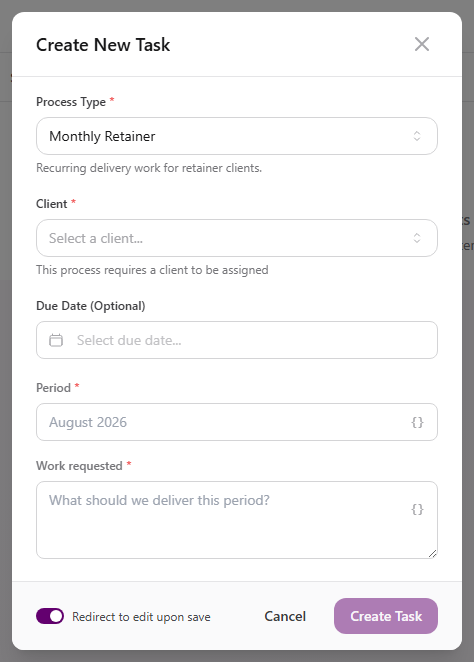
Complete Client:
- A red asterisk means the selected process requires a client.
- Client (Optional) can be left empty.
-
Set Due Date when needed. The form marks it optional unless the selected process requires it.
-
Complete every process field marked with a red asterisk.
-
Leave Redirect to edit upon save on when you want to open the new task immediately.
-
Select Create Task.
View full size
The process type can add different fields to this form. Required fields such as a title come from the process definition you choose.
Assign the current stage
Section titled “Assign the current stage”Task creation and assignment are separate steps in this view.
- Open the new task. If Redirect to edit upon save was on, it opens automatically.
- In the right panel, find Assigned under Stage.
- Select Assigned and choose the team member or members responsible for the current stage.
- Close the picker to return to the task.
The users available for assignment can depend on the process, stage, department, and your access.
Expected result
Section titled “Expected result”- The task appears under the selected process type and in every Tasks queue it matches.
- The task contains the client, due date, and required field values entered during creation.
- The current stage shows the selected assignee or assignees.
Troubleshooting
Section titled “Troubleshooting”| Symptom | Likely cause | What to do |
|---|---|---|
| New Task is missing | You lack Create Processes | Ask a workspace owner to grant Create Processes |
| Process type is missing | The definition is inactive or unavailable to you | Confirm the process is active and you have access |
| Create Task stays disabled | A required field is empty or invalid | Complete each field marked with a red asterisk |
| Client cannot be left empty | The process requires a client link | Select a client before creating the task |
| Assignee is missing from the picker | Stage or department rules exclude that user | Review the stage’s assignment requirements with the process owner |
Related articles
 Concept Tasks & processes overview Understand how task types, process definitions, stages, fields, layouts, assignments, and tasks fit together.
  How-to Work a task Work the current stage, update task details, complete required fields, and move a task through its configured stages.
  Concept Task fields and layouts Understand where task field values are stored, where fields appear, and how to edit task and stage information.
  How-to Find tasks Use Tasks queues, process views, search, stage and assignee filters, tables, and boards to find work.