
SOPs and training overview

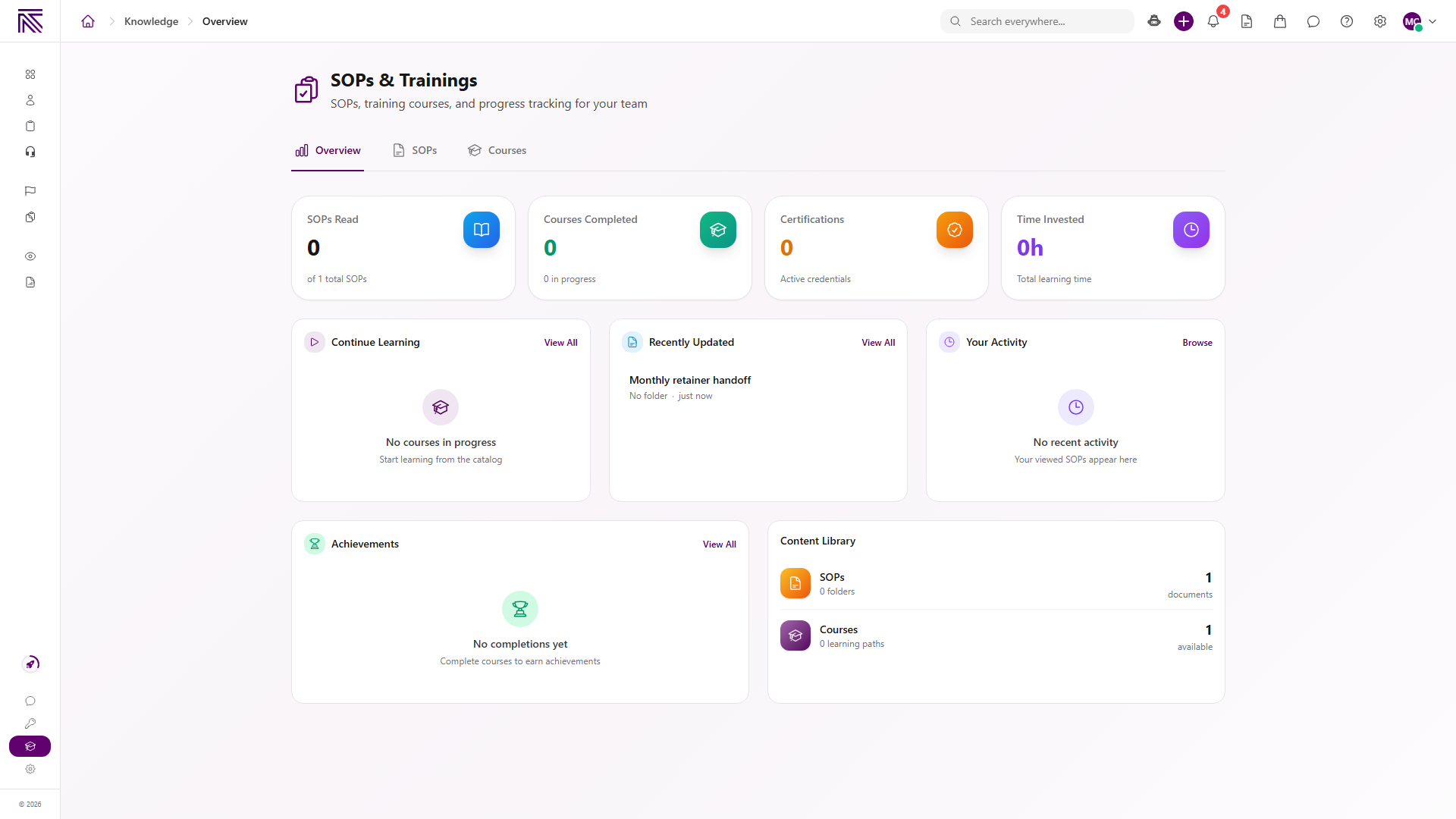
SOPs & Trainings is the place your team reads published procedures and completes training. An SOP is how-to documentation. A course is a lesson path you start and finish. Neither one replaces a task or a ticket.
Who this is for
Section titled “Who this is for”Agency team members granted View SOPs and View Training. Creating content requires Create SOPs or Create Training. Quizzes also require Take Training Quizzes. Owners and Admins have full access.
Open SOPs and training
Section titled “Open SOPs and training”- Sign in to the agency app.
- Open SOPs & Training ( /knowledge (opens in new tab) ). The page heading is SOPs & Trainings.
- Use the tabs: Overview, SOPs, and Courses.
How the area is organized
Section titled “How the area is organized”| Area | What it is for |
|---|---|
| Overview | Your SOPs Read, Courses Completed, Certifications, and Time Invested, plus Continue Learning, Recently Updated, Your Activity, Achievements, and Content Library. |
| SOPs | Published procedures. Search with Search SOPs…. Folders use the SOPs all-items label. |
| Courses | Published courses and learning paths. The list heading is Training. Search with Search training…. |
Empty Continue Learning shows No courses in progress. Empty Recently Updated shows No recent updates. Empty Your Activity shows No recent activity. Empty Achievements shows No completions yet.
Empty SOPs shows No SOPs yet. A search miss shows No results found. Empty Courses shows No training content yet.
Required Training appears at the top of Overview when a course is assigned to you.
SOP versus course versus process
Section titled “SOP versus course versus process”| Record | What it is |
|---|---|
| SOP | A published procedure your team reads. Open it from SOPs. |
| Course | A training path with lessons. Open it from Courses, then Start Course or Continue. |
| Process definition | The reusable setup for planned tasks. Work those as tasks, not here. |
A published SOP can be attached to work elsewhere. Reading it here does not complete a task. Starting a course does not create a ticket.
Draft and review items stay in Settings until someone publishes them. The SOPs and Courses lists show published content.
Settings
Section titled “Settings”Create and edit procedures in Settings, then SOPs ( /settings/sops (opens in new tab) ). Create and edit courses in Settings, then Training ( /settings/training (opens in new tab) ). Those pages require create or edit access. Daily reading stays on SOPs & Trainings.
Guides in this category
Section titled “Guides in this category”Related articles
 Concept Welcome to AgencyTitan Sign in, find the main areas of the agency app, and choose a first-week path.
  How-to Use SOPs and training Find a published SOP, open a course, start or continue a lesson, and know when Settings is required.
  Concept Tasks & processes overview Understand how task types, process definitions, stages, fields, layouts, assignments, and tasks fit together.
  Concept Core Concepts Learn the AgencyTitan product model: workspace, clients, tasks, tickets, escalations, chat, SOPs, training, views, automations, programs, and settings.